


 Meal planning for the whole household · Free during beta
Dinner time, made easy.
Finally, a family decision that doesn’t need a family meeting.
No card. Works in your browser on iPhone, Android and desktop.
- Kids get a profile, no account needed
- Bring recipes from any link or cookbook
- Export or delete everything in one tap







Who does what
Everyone gets a job. A very small one.
One person plans. Everyone else chips in from their own phone, in seconds.
Sam
The planner
Picks a theme, approves the week and makes the final call. About four minutes.
Alex
The partner
Taps a vote. Sees tonight’s dinner. That’s it. Really.
Noah and Milo
The kids
A profile each, no account needed. Their requests and restrictions count.
The whole house
Everyone
A private My Food space for favorites and cravings. Purple means it’s just yours.
How it works
From votes to a grocery list, on its own.
About ten minutes to set up your household. About four minutes a week after that.
1Vote
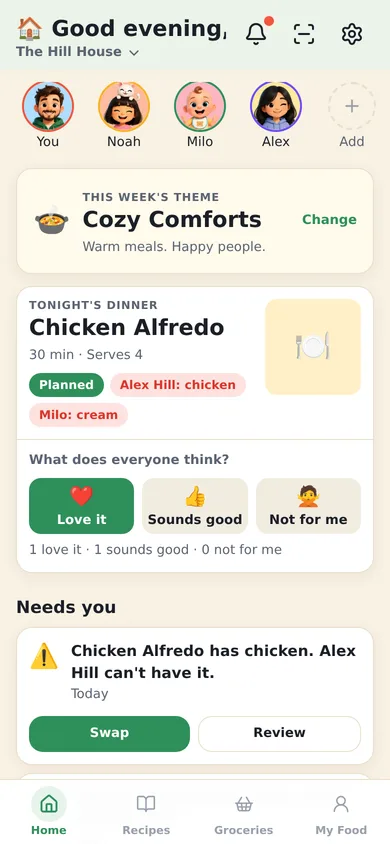
Pick a theme like Cozy Comforts. Everyone weighs in on seven ideas from their own phone.
2Choose
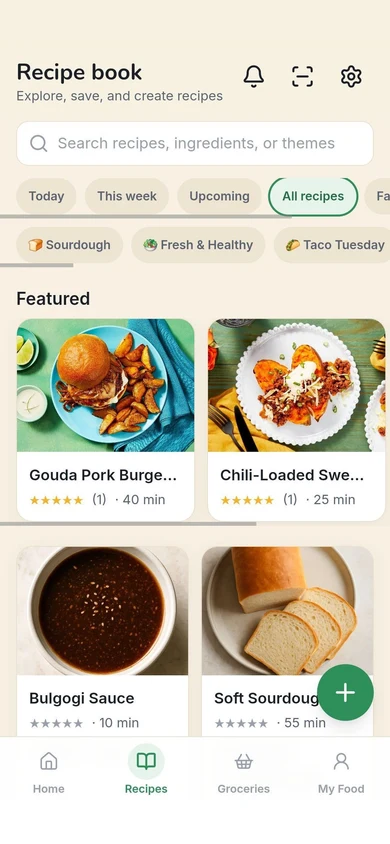
Pull from your recipe book or fresh ideas, then make the final call. Anything that conflicts comes with a swap.
3Shop
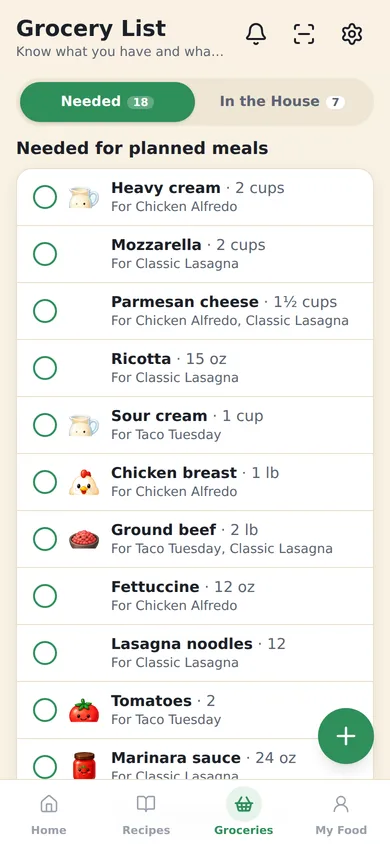
One list on every phone, minus what’s already in the house, grouped by aisle.
4Scan
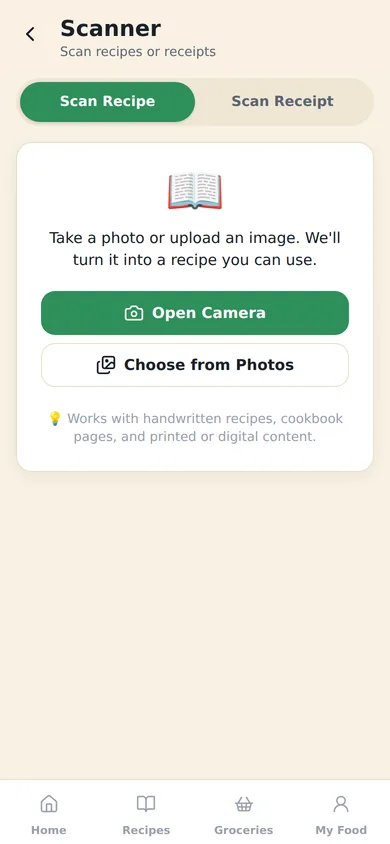
Snap the receipt. The list ticks itself off and what’s in the house updates.
Free during beta. No card.
Every kind of household
Picky eaters, allergies and a five-year-old. All in one plan.
Add everyone once, with their allergies and no-gos. Kids are profiles you manage. From then on, every plan is made for all of them.
- AlexNo chicken
- Noahkid profileNo peanuts
- Milokid profileNo cream


Made for every kind of household.
Allergies and no-gos
Every meal gets checked. Conflicts come with a swap.
foodoodle checks each dinner against everyone’s saved restrictions. Anything that may conflict is flagged before it reaches the list, with a swap ready. You make the call.
It’s a helper, not a guarantee. It checks the ingredients we know about, so keep reading labels.
Chicken Alfredo has chicken. Alex can’t have it.

- Chicken breastAlex · no chicken
- Heavy creamMilo · no cream
- Fettuccine, parmesan, garlicFine for everyone
Swapped to Mushroom Alfredo, cream-free.
It works for everyone now, and the grocery list already changed: chicken and cream are off, mushrooms are on.
All four can eat Monday’s dinner.
One real week
What dinner sounds like now.
This is the week foodoodle planned for our test household, flags and all.
- Mon
 Chicken AlfredoHas chicken · AlexSwap suggested
 - Tue
 Taco TuesdayNoah’s request
 - Wed
 Teriyaki BowlsHas chicken · AlexSwap suggested
 - Thu
 Peanut Satay NoodlesHas peanuts · NoahSwap suggested
 - Fri
 Sushi NightNoah’s birthday pick
 - Sat
 Classic LasagnaHas cream · MiloSwap suggested
 - Sun
 Veggie ChiliUses what’s in the house
- 7dinners planned
- 18items on one list
- 4conflicts caught before the store

What stays private
Your personal food stuff is yours.
- Favorites, cravings and requests stay private until you share them. In the app, purple means it’s just yours.
- Restrictions are shared only with whoever plans, so every meal can be checked.
- The app suggests, you approve. Export or delete everything from Settings, one tap each.
Questions
The ones every household asks.

Will my partner actually use it?
Their part is tapping a vote and seeing tonight’s dinner. That’s it.
Is it free?
Yes, during beta. No card and no trial clock. We’ll tell you clearly before that ever changes.
Do my kids need accounts?
No. Add a profile for each child. You manage it, and their restrictions apply to every plan.
Can I rely on it for allergies?
It flags meals that may conflict with the restrictions you save, based on the ingredients we know about. It is a helper, not a guarantee. Always check labels and recipes yourself.
How long does setup take?
About ten minutes the first time: name your household, add people, and save any dietary restrictions. After that, most weekly plans take about four minutes.
Does it work on iPhone and Android?
Yes. It runs in your browser on iPhone, Android, and desktop, and you can add it to your home screen like an app. App store versions are coming.
Can I add recipes from other apps?
Yes. On Android, share a link from your browser, YouTube, or wherever you found it once foodoodle is on your home screen. On iPhone, copy the link and paste it in. Cookbook pages scan straight in too.
Get everyone in on dinner.
Start your household free, then invite everyone with one link. You’ll plan this week’s dinners in about four minutes.
Start your household freeFree during beta. No card. Any phone or computer.