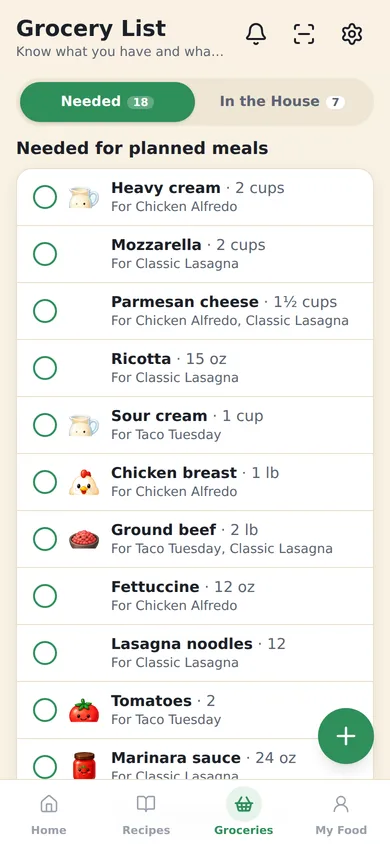
Built from the week’s meals
When a dinner goes on the plan, its ingredients go on the list. Quantities follow the servings: cooking a four-serving recipe for six scales it. Open any item to see who it’s for: “2 cups for Chicken Alfredo · 1 cup requested by Noah”.
Change a meal, swap a recipe or say you’re out on Thursday, and the list updates. Nothing to recount.
Minus what’s already at home
foodoodle keeps a second list, In the house: what’s in the fridge, freezer and pantry. What’s there comes off what you need, so you don’t buy a third jar of cumin.
Same things add up; different things stay apart. Two recipes that need milk make one line. Almond milk never merges with milk.
Anyone can add to it
Everyone in the household can add what they need, from their own phone. Requests show who asked. A household can have a planner approve requests first, if it wants.
Swipe an item in the house back onto the list when you’re running low.
In the store and after
- Grouped by aisle, or by meal, whichever you shop by.
- Tick it off as you buy, and it moves to In the house.
- Snap the receipt afterwards. foodoodle reads it, ticks off what you bought and updates what’s at home. You check it before anything saves.
- Scanned it twice? It notices the same receipt and says so, before anything is counted.
Or send it to Amazon
Shopping online instead? Tap Shop this list on Amazon. Everything foodoodle can match goes over as one Amazon cart, added to whatever is already in yours, and anything it can’t match is a search, one tap each. A long list goes over in parts, and nothing is left off.
As an Amazon Associate I earn from qualifying purchases.